Harmonium
- 4.4
- Rating
- 10.00M
- Installs
- Free
- Price

 Analysis by App-foxy
I approached Harmonium as a small musical instrument rather than as a conventional game, and that distinction explains both its appeal and its limits. The first thing I noticed is that the central action is immediate: tap a key, hear a note, move to another key, and gradually turn isolated sounds into a phrase. There is no complicated setup standing between curiosity and playing. For anyone who wants a quick way to explore harmonium-style sounds on a phone, that simplicity is the main attraction.
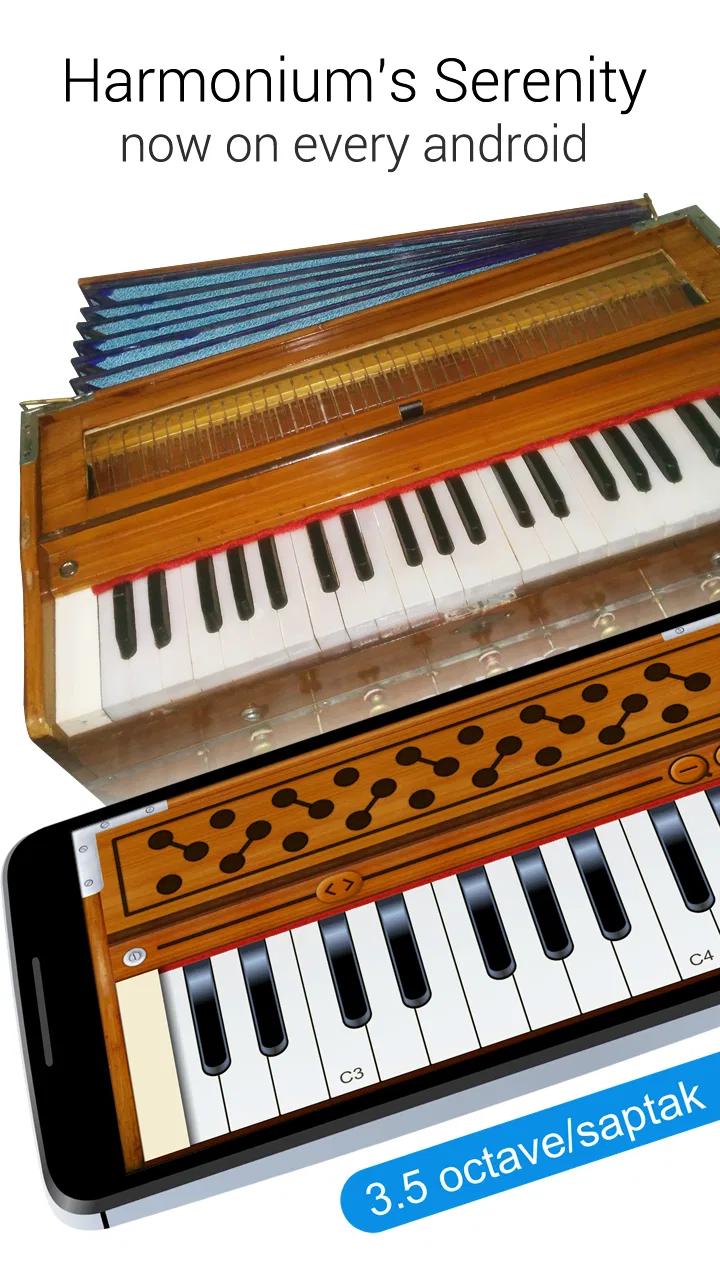
GameG’s music title presents an eighty-eight-key layout and a broad seven-point-three-saptak octave range. It is free to install, available to an Everyone audience, and includes optional purchases priced at four dollars and ninety-nine cents per item. The app has been available since August ninth, two thousand seventeen, and its reach is reflected in more than ten million installs. A four-point-four average from roughly sixty-four thousand ratings suggests that many people find the basic experience satisfying, although popularity alone does not make it a substitute for a physical instrument.
From the first tap to the reason I kept playing
I start by treating the first few taps as a quick check of how the keyboard feels on my screen, not as a test of musical skill. That makes it easier to notice whether I can reach the notes I want comfortably and whether a short phrase sounds clear enough to keep exploring. From there, the more interesting question is what turns casual tapping into a reason to return.
You May Also Like

 Blood Strike: 2.5 Anniversary
Blood Strike’s Loadouts Turn Every Drop Into a Tactical Gamble
A close look at Blood Strike’s custom loadouts: how fast access to signature weapons reshapes its battle royale rhythm, rewards preparation, and narrows the gap between fights.

 Pandora - Music & Podcasts
Pandora’s Music Is Easy to Start, but Harder to Recover
Pandora’s strength is its low-effort path from a seed to a station. Its weak spot is how much confidence it asks you to place in connection, setup, and quiet recovery.

 8 Ball Pool
 Is Built on Rivalries, Rematches, and Routine
A close look at the rivalries, rematches, shared routines, and unanswered safety questions that turn a quick pool match into a persistent mobile community.

 Samsung Music
’s Quiet Strength Is Playing What You Already Own
Its reach comes less from spectacle than from dependable access to a personal library. That simplicity is both the app’s strongest retention engine and its ceiling.

 AccuWeather: Weather Radar
AccuWeather Review: A Quick, Clear Forecast for Everyday Decisions
For everyday plans, the best forecast is the one you can understand quickly. AccuWeather makes rain timing, radar, and local conditions easy to act on, with a few trade-offs.

 Hill Climb Racing
Why Hill Climb Racing Still Turns Crashes Into One More Run
A tiny car, a bumpy hill and one more upgrade: Hill Climb Racing keeps resurfacing because its simple chaos makes every near-miss feel personal.
More From Our News Desk
View All News


The first action is deliberately simple
My first useful test was not trying to perform a song. I simply moved across the keyboard and listened to how the notes responded. That is the right starting point here because the app rewards exploration before it asks for commitment. A beginner can tap individual keys, compare higher and lower registers, and begin to recognize how spacing changes the character of a melody.
The wide keyboard is important in practice. A compact piano app often feels like a toy because it shows only a narrow slice of the instrument. This one gives the player room to think in terms of register. You can start a phrase in a comfortable middle area, then shift upward for a brighter answer or downward for a heavier one. On a phone, the full range is naturally more difficult to view at once, so I found myself treating the keyboard as a surface to navigate rather than a fixed panel.
That creates the first meaningful trade-off. The large range is useful for learning where notes sit, but a touchscreen is not as forgiving as real keys. Fingers can cover neighboring notes, and quick passages are harder to control than they would be on a physical harmonium or keyboard. I would therefore use this app to sketch ideas, practice note relationships, or satisfy curiosity, not to judge my technique for a formal performance.
The most practical first-session routine is to choose a small group of nearby notes and repeat them slowly. Instead of jumping around the entire keyboard, I would play a short rising pattern, pause, and then try the same pattern in a different register. This makes the response easier to hear and turns random tapping into a basic ear-training exercise. It is also less tiring on a small screen.
Feedback arrives as sound, not as a score
The feedback rhythm is the heart of the experience. In a typical mobile game, an action produces points, a visual effect, or progress toward a level. Here, the response is musical: each tap produces a note, and the next note either fits the idea in your head or exposes that it does not. That immediate cause-and-effect relationship is what makes the app feel interactive even without a conventional challenge structure.
I liked that the reward is tied to listening. When I found a short sequence that sounded coherent, I naturally repeated it and adjusted the timing. When a note felt wrong, the mistake was easy to identify because it interrupted the phrase. This is a modest but useful form of feedback for beginners who are trying to understand intervals. The app does not need to tell you that a note is higher; your ears receive that information instantly.
There is also a quiet benefit for people who are nervous about music practice. A physical instrument can make a beginner feel exposed, especially when every mistake is loud in a room. With a phone, experimentation feels private and low-pressure. I could test a melody while waiting for an appointment, then stop without packing anything away. That convenience is more valuable than it sounds because it lowers the effort required to begin.
At the same time, the feedback is limited by the nature of a touchscreen. A real harmonium gives the player a physical relationship with keys, pressure, spacing, and the instrument’s body. A phone mainly gives you a visual keyboard and audio response. If your goal is to develop finger strength, coordinated hand movement, or the feel of pumping and sustaining a harmonium, this is the wrong tool. The app can represent notes, but it cannot recreate the complete physical experience.
Why a short phrase becomes its own reward
The reward in Harmonium is not a badge or a level. It is the moment when a few taps become recognizable music. I found that the most enjoyable sessions came from setting a tiny target: reproduce the opening of a familiar tune, find a pleasing chord-like combination, or make a simple phrase sound more deliberate by changing its register. These goals are small enough to reach quickly, which is why another session often feels inviting.
This makes the app especially suitable for casual learners and curious listeners. Someone who has never touched a keyboard can use it to discover the relationship between note height and melody. A singer might use it to locate a starting pitch before practicing. A songwriter could tap out a rough idea before deciding whether it deserves a fuller arrangement. None of these uses requires a long lesson, and the app’s free entry point makes experimentation easy.
One useful habit is to hum a phrase first and then search for it on the keyboard. That reverses the usual process of tapping until something sounds pleasant. It trains the connection between an imagined sound and a physical location on the screen. I also recommend beginning in one register and resisting the urge to chase every possible octave. The broad range is an advantage, but too much movement can make a simple idea harder to remember.
Another practical use is checking melodic direction. If I am unsure whether a phrase rises at the end, I can play the suspected notes and listen for the shape. This is not a replacement for music theory, but it is a quick way to turn an abstract question into an audible comparison. The app works best when treated as a pocket reference instrument rather than as a complete course.
The reset is part of the appeal
My sessions usually ended naturally rather than because the app forced a conclusion. I would play a phrase, lose interest, put the phone down, and later return with a different idea. That reset is important. There is no pressure to preserve a long run or protect a score, so starting again feels clean. The next session can be about a different melody, a different register, or simply five minutes of sound.
This structure suits everyday situations. Imagine having a melody in your head while riding home or waiting for a friend. A physical harmonium is impossible to carry into that moment, while this app gives you a way to test the idea immediately. You may not create a finished composition, but you can confirm the contour, remember a few notes, and decide whether to develop it later.
The same reset can be a weakness for players who need a clear learning path. If you want lessons, timed exercises, recorded progress, or increasingly difficult challenges, the open-ended design may feel empty. The app does not turn curiosity into a structured curriculum by itself. You have to bring your own goal, and that means its value depends heavily on how intentionally you use it.
I would also be cautious about using it as the only practice method. Short, informal sessions are excellent for keeping musical ideas alive, but they do not provide the physical discipline of regular work on a real instrument. For a serious student, this belongs alongside lessons or an actual keyboard, not in place of them.
How it compares with ordinary alternatives
Compared with a physical harmonium, the obvious advantage is portability. The phone is always close, starts with less preparation, and avoids the cost and space of a full instrument. The disadvantage is equally clear: the screen lacks physical key travel and the expressive control that makes a real instrument rewarding. If authentic touch and sustained practice matter most, the physical option wins.
Compared with a general piano simulator, Harmonium’s identity is more focused. A broad piano app may be better for users who want a familiar keyboard interface, song lessons, accompaniment tools, or a wider collection of instruments. This app makes more sense when the harmonium sound and layout are the reason you are opening it. I would choose the general alternative for structured learning, but choose this one for quick melodic exploration.
Compared with a tuner or pitch-reference app, it is more hands-on. A tuner tells you about a sound you produce; this gives you notes to play and compare. That makes it a better companion for finding a starting pitch or checking a melody, though it is not designed to replace the specialized accuracy of a dedicated tuning tool.
The optional purchases also affect the decision. The basic free access is enough to decide whether the keyboard suits your habits, but a person who dislikes in-app purchases may prefer a simple physical instrument or a paid app with a different pricing model. I would spend only after using the free experience long enough to know that the touchscreen layout genuinely helps me. Paying for a feature I rarely use would defeat the app’s main advantage: low-friction experimentation.
Who will enjoy it, and who should skip it
I would recommend this music game to beginners, singers, casual composers, students looking for a portable note source, and anyone curious about harmonium-style playing without committing to a full instrument. It is also a good fit for people who enjoy discovering melodies by ear. The large keyboard gives more room than many miniature simulators, and the immediate sound response makes the learning curve approachable.
I would skip it if my priority were professional recording, detailed arranging, realistic physical technique, or a guided teaching program. A musician who already owns a keyboard may find the phone interface too cramped for serious performance. Someone seeking rhythm challenges, competitive scoring, or a progression system may also feel that the experience lacks the usual game-like motivation.
For parents, the Everyone age rating makes the app suitable for a broad audience, but I would still present it as a creative tool rather than as an automatic lesson. A child can explore notes safely and enjoy making short patterns, yet meaningful progress will come from an adult helping turn that play into listening, repetition, and musical questions.
My verdict on the complete loop
The complete loop is easy to understand: tap a key, hear the result, adjust the next note, enjoy a phrase when it works, stop when the idea is finished, and return when another melody appears. That loop is modest, but it is tangible and honest. The app does not need elaborate rewards because the sound itself supplies the reason to continue.
After testing it as both a casual instrument and a game-like pastime, I see its strongest quality as accessibility. It removes the physical and financial barriers that often stop people from trying a harmonium. The broad range encourages exploration, while the immediate response gives beginners something concrete to listen for. Its weaknesses are the same ones that come with almost every touchscreen instrument: limited physical expression, possible crowding on a small display, and little structure for users who want a formal path.
With its four-point-four average and audience of over ten million installs, it has clearly found a place among mobile music tools. I would not call it a replacement for a real harmonium, nor would I use it as my only method of learning. But as a free, portable way to test melodies, practice hearing intervals, and begin a spontaneous musical session, Harmonium is genuinely useful. I would recommend it to a friend who wants to play immediately and decide later whether deeper study deserves a larger instrument.
FAQs for Harmonium
01What is Harmonium and how does it enhance my music experience?
Harmonium is a versatile music app designed for both beginners and experienced musicians. It offers a digital representation of the traditional Indian harmonium, allowing users to explore a wide range of Indian classical music. With features like customizable scales, adjustable tempo, and a rich library of sounds, it enhances your music experience by providing an authentic and seamless way to practice and perform.
02Is Harmonium suitable for beginners in music?
Yes, Harmonium is highly suitable for beginners. The app comes with a user-friendly interface and helpful tutorials that guide new users through basic concepts and playing techniques. Additionally, it offers practice exercises and adjustable difficulty settings, making it easy for beginners to learn at their own pace and gradually improve their skills.
03Does Harmonium require an internet connection to function?
Harmonium does not require a constant internet connection for its basic functionalities. Once downloaded, users can access most features offline, which is great for uninterrupted practice sessions. However, certain features like updates, additional sound packs, or online tutorials may require an internet connection to download or stream.
04What devices are compatible with Harmonium?
Harmonium is compatible with both Android and iOS devices. It supports a wide range of smartphones and tablets, ensuring a smooth and responsive user experience. However, for optimal performance, it is recommended to use the app on devices running the latest versions of Android or iOS.
05Are there in-app purchases or ads in Harmonium?
Harmonium offers a free version with ads, which provides access to basic features. For an ad-free experience and access to premium features such as additional sound packs and advanced settings, users can opt for in-app purchases. This allows users to customize their experience based on their preferences and needs.
Pros
- Intuitive interface for beginners.
- Wide range of sound customization.
- Offline mode is available.
- Light on system resources.
- Regular updates with new features.
Cons
- Limited free version features.
- Ads can be intrusive at times.
- Requires in-app purchases for full access.
- Occasional minor bugs.
- No support for external MIDI keyboards.

Harmonium
Gallery